

11. Leer archivo de Excel
Requisitos:
- Servidor Web, PHP y MySQL.
- PHPExcel. Descargar
Cuando tenemos un sistema de información y es necesario que los usuarios carguen gran cantidad de datos es un trabajo tedioso, para esto podemos utilizar cargas masivas mediante una plantilla en Excel.
1. Ejemplo de archivo en Excel para leer (ejemplo.xlsx)
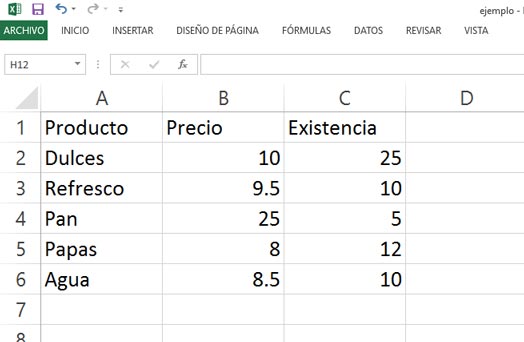
2.Crear Base de Datos
|
1 2 3 4 5 6 7 8 9 10 11 12 13 14 15 |
CREATE DATABASE IF NOT EXISTS `excel` DEFAULT CHARACTER SET latin1 COLLATE latin1_swedish_ci; USE `excel`; -- -------------------------------------------------------- -- -- Estructura de tabla para la tabla `productos` -- CREATE TABLE IF NOT EXISTS `productos` ( `id` int(11) NOT NULL, `nombre` varchar(150) NOT NULL, `precio` decimal(10,2) NOT NULL, `existencia` int(11) NOT NULL ) ENGINE=InnoDB AUTO_INCREMENT=1 DEFAULT CHARSET=latin1; |
3. Archivo de Conexión (conexion.php)
|
1 2 3 4 5 6 7 8 |
<?php $mysqli=new mysqli("localhost","root","password","excel"); //servidor, usuario de base de datos, contraseña del usuario, nombre de base de datos if(mysqli_connect_errno()){ echo 'Conexion Fallida : ', mysqli_connect_error(); exit(); } ?> |
4. Script para leer Excel y guardar contenido en MySQL (leer.php)
|
1 2 3 4 5 6 7 8 9 10 11 12 13 14 15 16 17 18 19 20 21 22 23 24 25 26 27 28 29 30 31 32 33 34 |
<?php require 'Classes/PHPExcel/IOFactory.php'; //Agregamos la librería require 'conexion.php'; //Agregamos la conexión //Variable con el nombre del archivo $nombreArchivo = 'ejemplo.xlsx'; // Cargo la hoja de cálculo $objPHPExcel = PHPExcel_IOFactory::load($nombreArchivo); //Asigno la hoja de calculo activa $objPHPExcel->setActiveSheetIndex(0); //Obtengo el numero de filas del archivo $numRows = $objPHPExcel->setActiveSheetIndex(0)->getHighestRow(); echo '<table border=1><tr><td>Producto</td><td>Precio</td><td>Existencia</td></tr>'; for ($i = 1; $i <= $numRows; $i++) { $nombre = $objPHPExcel->getActiveSheet()->getCell('A'.$i)->getCalculatedValue(); $precio = $objPHPExcel->getActiveSheet()->getCell('B'.$i)->getCalculatedValue(); $existencia = $objPHPExcel->getActiveSheet()->getCell('C'.$i)->getCalculatedValue(); echo '<tr>'; echo '<td>'. $nombre.'</td>'; echo '<td>'. $precio.'</td>'; echo '<td>'. $existencia.'</td>'; echo '</tr>'; $sql = "INSERT INTO productos (nombre, precio, existencia) VALUES('$nombre','$precio','$existencia')"; $result = $mysqli->query($sql); } echo '<table>'; ?> |